Equipment for meeting rooms, classrooms and video conferencing
ITA Touch manufactures and wholesales interactive panels, smart podiums, touch tables, document cameras, hybrid whiteboards and compute modules — one catalog for a whole project, from a small huddle room to a full auditorium.
Touchscreen displays for meeting rooms, classrooms and halls — from a compact panel for quick huddles to a large-format board for an auditorium.
Note: all prices are indicative ex-factory quotes in Chinese Yuan (¥ / CNY) and vary by size and configuration — request a formal quotation for your project.
¥8,500 – ¥21,800indicative, by size · 86″ shown ≈ ¥15,000
Standard configurationCamera configuration
The flagship of the line — an all-metal enclosure in anodized aluminum with 4 mm tempered glass (7H protection) and two magnetic slots for styluses. A screen from 86″ with resolution of at least 3840×2160 (4K), DLED backlight, brightness from 350 cd/m² and dynamic contrast (DFC) from 10,000:1 delivers a clear picture even in a room with windows and overhead lighting.
The driver-free (HID) infrared multi-touch screen supports up to 20 simultaneous touch points on Android and up to 40 on Windows, with ±1 mm positioning accuracy and under 5 ms response time — several people can write and browse documents at once. It runs on Android 14 (8-core Cortex-A55, Mali-G52 MC2, 8 GB RAM, 64 GB storage) and accepts a swappable OPS module for Windows, Linux or macOS — the platform isn't locked to one OS or one interface language, with Kazakh, Russian and English all supported.
The optional 48 MP camera and 8-microphone array with sound-source recognition turn the panel into a full video conferencing system without a separate conferencing kit — just a laptop or the built-in OPS module with any video-calling service is enough.
ITA-Q5500
QLED panel · 55″ / 65″ / 75″
Small and mid-size meeting rooms
¥7,500 – ¥12,500indicative, by size
A QLED matrix with an extended color gamut and deep black suits presentations that need accurate color — design studios, showrooms, marketing teams. The enclosure is thinner than DLED-backlit models, which makes mounting on a lightweight wall easier.
Infrared multi-touch with 20 points, Android with a preloaded office suite and wireless screen casting — the panel is ready to use straight out of the box, no separate computer needed.
ITA-EDU7500
Classroom panel · 75″ / 86″
Schools, training centers
¥9,000 – ¥12,000indicative, by size
A simplified, more affordable version for classrooms: the same 4K matrix and IR multi-touch, but without an OPS slot — just Android with preloaded whiteboard, annotation and classroom collaboration software.
A reinforced frame and protective glass withstand daily classroom use, and the built-in speakers cover a mid-size classroom without extra audio gear.
4K, IR touchInteractive whiteboard softwareNo OPS — lower cost
ITA-AI9800
AI sync-writing board · 98″ / 110″
Auditoriums, amphitheaters
¥22,000 – ¥28,000indicative, by size
A large-format panel for big auditoriums: handwriting from an ordinary marker module syncs to the screen and to remote participants in real time, while AI handwriting recognition turns handwritten notes into text.
The larger diagonal keeps text and graphics legible from the back rows without an extra projector.
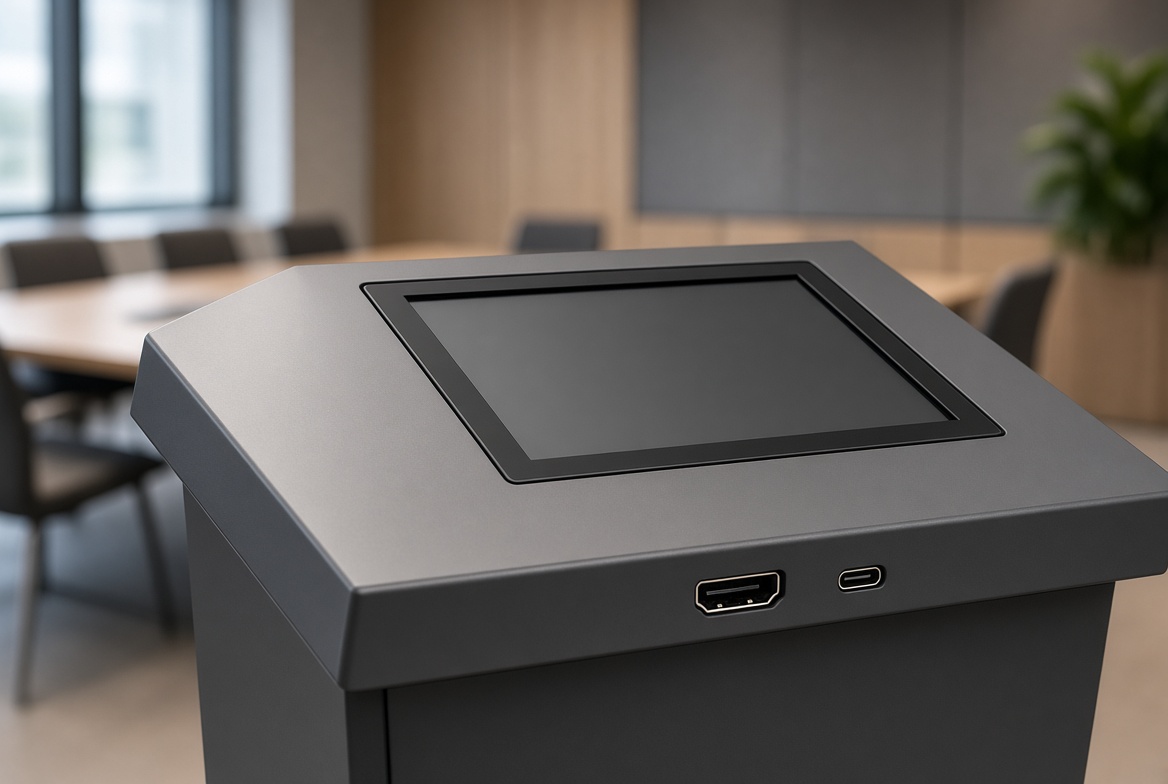
A built-in 23.8″ touchscreen replaces a separate laptop on the lectern for the presenter: switching slides, adjusting volume and choosing the input source — right from the control panel. HDMI and USB-C are routed to the tabletop for quick connection of the speaker's device.
ITA-POD22WPodium with built-in PC · Windows OPSLecture halls, conferences
¥6,500 – ¥7,800indicative
A Windows OPS module built into the podium body — presentations, documents and video calls run without connecting an external computer. Room-wide signal control: screen, stage lighting and sound from one panel.
ITA-POD24MMobile podium · on castersTraining centers, rented venues
¥3,800 – ¥4,500indicative
The same electronics as the stationary version, but on a mobile, height-adjustable base for a seated or standing presenter — convenient for venues where the event layout changes often.
A table-screen for collaborating on layouts and diagrams: several people move objects on the surface at once, like on paper, but with the option to save and share the result.
The top version of the table forms the centerpiece of a meeting room instead of an ordinary table: participants sit around the perimeter, and meeting materials are shown on the surface facing each person correctly, without flipping the image.
Up to 86″Correct orientation for every participant
Show paper documents, drawings and objects online — for hybrid meetings and classes where remote participation matters as much as being in the room.
Note: indicative ex-factory prices in CNY (¥), depend on configuration — ask for a formal quote.
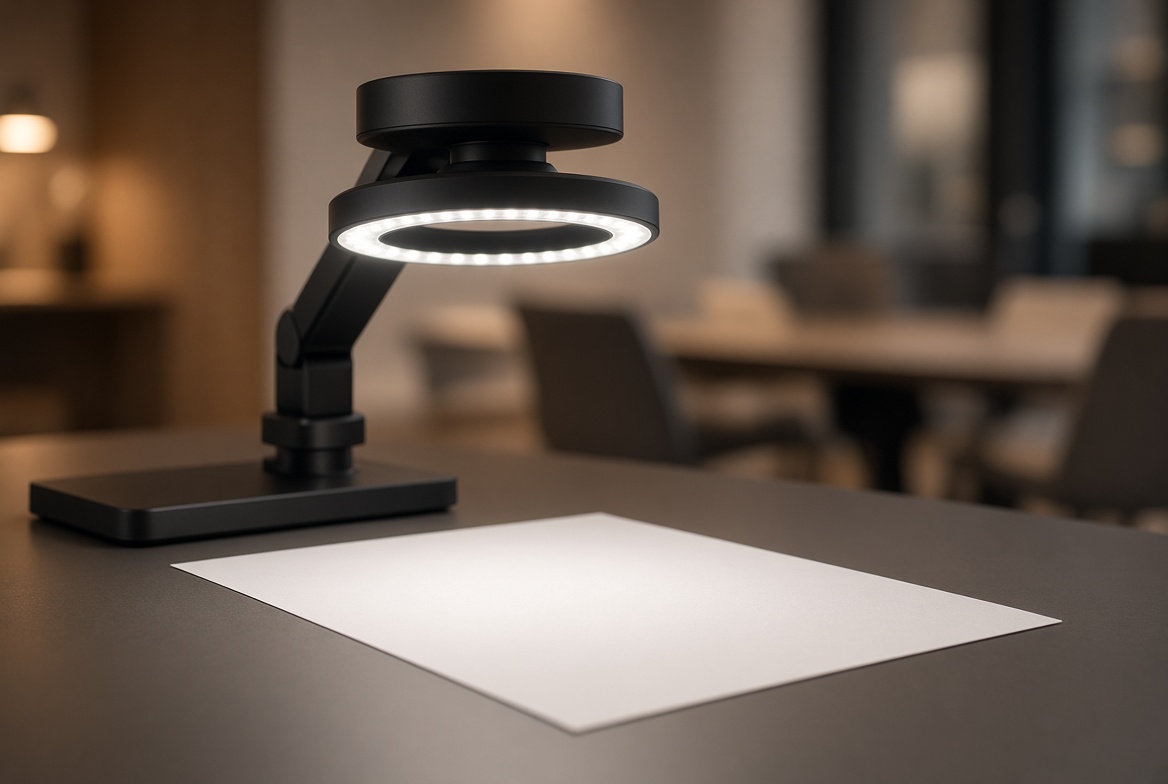
ITA-DOC8Basic camera · 8 MPClassrooms, small offices
¥650 – ¥850indicative
Simple USB connection to a panel, laptop or OPS module. Enough for showing text and diagrams on paper — an inexpensive option for a room where a document camera is needed occasionally rather than daily.
A ring LED light removes hand shadows when showing documents and small objects, and an HDMI output (alongside USB) lets you send the image to a local screen and a conference call at the same time.
A multi-joint articulating arm aims at a page, a model or a lab sample from any angle. Resolution up to 4K keeps fine text and drawing detail legible under digital zoom.
Ordinary markers on a matte surface, plus a camera bar on top that captures and transmits the writing to remote participants without glare or angle distortion — cheaper than a full touch panel where touch isn't needed.
Two synchronized surfaces side by side — for working on two topics in parallel or comparing "before/after" in a training session, with both boards streamed together into the call.
A folding frame and light housing let you move the board between meeting rooms or venues — the same writing sync as the stationary models, with no wall mounting.
Intel Core i3, 4 GB RAM, 128 GB SSD — enough for presentations, documents and video calls without video editing or heavy graphics. The most affordable way to get full Windows inside a panel.
Intel Core i5 (2.5 GHz and up), 8 GB DDR RAM, 256 GB SSD and up, Wi-Fi/5G and Gigabit networking — a configuration built for most meeting-room scenarios, from office suites to hours-long video conferences.
ITA-CASTCompact Android moduleSmall rooms without Windows
¥380 – ¥480indicative
A lighter alternative to a full OPS module: just wireless screen casting and basic calling apps — for cases where Windows is overkill and the panel needs to be "turn on and go".
What's usually ordered alongside a panel — from wireless screen casting to mounts and mobile carts.
Note: indicative ex-factory prices in CNY (¥), depend on configuration and order quantity — ask for a formal quote.
ITA-CASTDongleWireless casting adapterAny panel or projector with HDMI
¥280 – ¥350indicative
Plugs into any screen's HDMI input and receives a cast from a laptop or phone with no cables and no drivers to install — a quick way to let a guest in the meeting room show their screen.
ITA-CamSpeakerUSB camera with speakerphoneSmall meeting rooms, laptop calls
¥650 – ¥850indicative
A camera and speakerphone in one housing for rooms where the call runs through a laptop rather than the panel's built-in module — a wide field of view and microphone noise suppression for 4–6 people at the table.
ITA Touch was founded in 2016 in Shenzhen as a manufacturer of interactive displays and digital signage. Over the years the company has built its own manufacturing site of over 20,000 m² with dedicated assembly and testing lines, achieved certification to major international standards (CE, RoHS, CB, TÜV, ISO 9001, ISO 14000 and others), and now ships to more than 50 countries — from schools and offices to government and retail projects.
The core principle is keeping manufacturing, assembly and quality control inside one company rather than assembling a line from third-party components. This makes it possible to offer not just off-the-shelf models but also OEM/ODM/SKD — supply under the customer's own brand or on-site assembly from knock-down kits.
Illustrative photos of manufacturing, quality control and the team — representative of the industry's typical process, not a photo shoot of one specific site.
2016
Manufacturing starts in Shenzhen
Launch of in-house assembly lines for interactive panels and digital signage.
→
Site expansion and certification
Manufacturing capacity grows past 20,000+ m²; international quality and safety certifications achieved.
→
Export growth
Supply chains built to more than 50 countries, including adapting products and packaging to different markets' requirements.
2026
Today
A full equipment line for meeting rooms and classrooms — from panels to accessories, plus OEM/ODM for partners.
How we work
How an order goes through
01
Inquiry and configuration
We clarify the use case (meeting room, classroom, hall), diagonal, whether an OPS slot and camera are needed — and propose 2-3 configuration options for the task and budget.
02
Quotation and costing
We send a quote with pricing, production lead time and shipping options; if needed, matched to a tender or the customer's technical specification.
03
Production and quality control
Assembly on our own lines, with every unit tested before export packing.
04
Logistics and customs
Export packing in wooden crates, choice of shipping route, and support with paperwork.
05
Installation and warranty
Guidance on mounting and setup, warranty support, and spare modules (including OPS) supplied when needed.
Why ITA Touch
In-house manufacturing and quality control at every stage
01
Own factory in Shenzhen
A 20,000+ m² manufacturing site with dedicated lines for interactive displays and digital signage.
02
OEM / ODM / SKD
Supply under the customer's own brand, or assembly from knock-down kits, is available.
03
Exports to 50+ countries
Experience with certification and adapting products for different markets, including export packaging.
04
One supplier for the whole project
Panels, tables, podiums and boards — from a single catalog, instead of piecing together mismatched brands.